


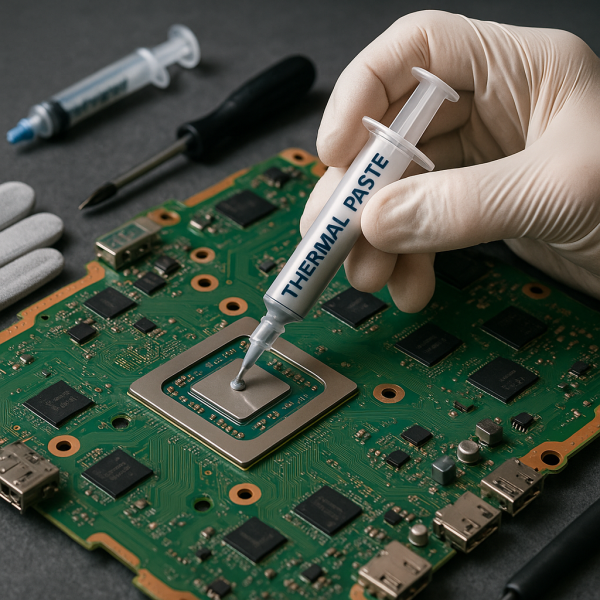
PS4 Thermal Paste Replacement
Professional PS4 thermal paste replacement: the technical maintenance that restores optimal cooling to your console. Full disassembly, removal of the old compound, application of high-conductivity paste and a temperature test. Compatible with the original PS4, Slim and Pro. 3-month warranty. Mail-in service available across Spain.
- Old compound removed and surfaces chemically cleaned
- High-conductivity thermal paste, with the exact amount and spread
- Temperature test with a demanding game before we hand your console back
- 3-month warranty · 24-48h delivery · Across Spain
In stock
Bring it to our repair workshop in Alcobendas (Madrid) or send it to us by mail from Spain. All PS4 repairs.
Description
Thermal paste lasts between 1 and 3 years, depending on use. Once it loses effectiveness, the processor can’t dissipate heat properly, even if the fan works fine. The result: a hotter console, a noisier fan and, if left alone, progressive damage to the motherboard. For €45 we sort it out with diagnosis included, high-quality compound and a 3-month warranty.
3-month warranty
PS4 Original · Slim · Pro
Workshop in Alcobendas (Madrid)
What PS4 thermal paste is and why it degrades
Thermal paste is the compound that fills the microscopic gaps between the PS4’s processor (APU) and the heatsink. Its job is to ensure perfect thermal contact between the two surfaces — without it, heat gets trapped in the chip and the temperature rises quickly.
With the heat built up over hundreds of hours of gaming, this compound gradually dries out and cracks. When that happens, thermal conductivity drops and the heatsink can no longer work efficiently — even if the fan is in perfect condition and there is no dust. It is an internal problem of the thermal interface that can only be solved by replacing the compound.
If your PS4 already shows active signs of overheating — a very noisy fan, excessive heat to the touch or protective shutdowns — the problem may be dust built up in the heatsink on top of dried-out paste. We have a dedicated page for that full diagnosis: overheating PS4 repair. Both services cost the same (€45) and include cleaning + paste replacement — the difference is the starting point of the diagnosis.
When does your PS4 need new thermal paste?
Two situations clearly point to it: when overheating symptoms appear, and when the maintenance interval is up even though the console seems to be running fine.
By time — preventive
Your PS4 has gone more than 12-18 months without thermal maintenance. The paste degrades with heat even if there are no visible symptoms yet.
The fan has been spinning faster and faster over time — a sign that the system is working harder to compensate.
The back of the console is noticeably hotter than before, especially after 30-45 minutes of gaming.
Protective shutdowns
The PS4 switches itself off during games — the processor has exceeded its temperature limit and the console shuts down to protect itself.
FPS drops or longer loading times — the processor automatically slows down to avoid overheating.
After a previous repair
If the console has been opened before for another repair, it’s a good idea to replace the thermal paste while it’s already taken apart.
Technical process: what the €45 covers
We measure the APU temperature while running a demanding game before opening the console. We record the starting value to compare it with the final result and confirm the service has worked.
Safe opening of the PS4 with specific tools for each model (Original, Slim, Pro). We remove the fan and heatsink using the correct procedure for each variant — taking the Pro apart is more complex and requires extra steps.
While it is apart, we clean the dust built up in the fan, heatsink, vents and motherboard with professional compressed air. Dust contributes to overheating just as much as dry paste — there’s no point replacing the paste without cleaning the whole system.
Complete removal of the old compound from the APU and the base of the heatsink. Chemical cleaning of both surfaces to remove any residue — a clean surface is essential for the new paste to bond properly and perform at its best.
We apply a high-conductivity thermal compound in the exact amount and with the right spreading technique for the PS4’s APU. Too much paste is as harmful as too little — both reduce thermal conductivity.
Full reassembly and a test with a demanding game for at least 30 minutes, monitoring the temperature in real time. We compare the final value with the initial one and hand it back to you with the temperature report and a 3-month warranty.
How often to service your PS4, by model and usage
| Model | Casual use (under 10h/week) | Regular use (10-20h/week) | Heavy use (over 20h/week) |
|---|---|---|---|
| PS4 Original (Fat) | Every 18-24 months | Every 12-18 months | Every 8-12 months |
| PS4 Slim | Every 18-24 months | Every 12-18 months | Every 10-12 months |
| PS4 Pro | Every 12-18 months | Every 10-12 months | Every 6-8 months |
The PS4 Pro needs more frequent maintenance because its APU generates more heat under high graphical load. If you play demanding titles such as Red Dead Redemption 2, God of War or 4K games on the Pro, shorten the intervals above by 20-30%.
Why professional application matters
The exact amount — no more, no less
Excess paste acts as an insulator. The optimal amount for the PS4 APU is critical and varies between models. We apply it with the right technique for each one.
Without prior cleaning, the new paste doesn’t bond properly over residue from the old compound. This step is essential and is often skipped by non-specialist workshops.
Verification with real data
We measure the temperature before and after. If the drop isn’t significant, we check what’s wrong. We don’t consider the service finished until we’ve confirmed it works.
3-month written warranty
If the console has thermal problems again after the service, we’ll check it at no extra cost. No small print.
Replacing the thermal paste on a PS4 means taking the console completely apart — including removing the heatsink, which is fixed directly onto the APU soldered to the motherboard. A handling mistake can bend pins, damage the APU or break the fan connector. The PS4 Pro adds further complexity with its vapour chamber system. And if the amount of paste isn’t exact or the surfaces aren’t clean, the result can be worse than before the replacement.
Frequently asked questions
How much does PS4 thermal paste replacement cost?
The full service costs €45 for PS4 Original, Slim and Pro. It includes full disassembly, internal dust cleaning, removal of the old compound, chemical cleaning of surfaces, application of high-quality paste, a temperature test and a 3-month warranty. There are no extra costs unless the diagnosis finds other damaged components.
How often should you replace the thermal paste on a PS4?
It depends on the model and usage. The PS4 Original and Slim with regular use need new paste every 12-18 months. The PS4 Pro, which generates more heat, needs it every 10-12 months with regular use and every 6-8 months with heavy use. In very dusty or hot environments, shorten these intervals. Don’t wait for symptoms to appear — the paste degrades before you notice the problem.
What type of thermal paste is used for the PS4?
We use high thermal conductivity compounds made for consoles — metal-free, so there is no short-circuit risk if any spills, with conductivity values above 8 W/mK. The choice of compound varies by model: the PS4 Pro can benefit from higher-performance compounds because of the greater thermal load on its APU.
Can I replace the PS4 thermal paste myself?
Technically it’s possible if you have experience taking electronics apart, the right tools (specific Torx and Phillips screwdrivers) and the right compound. The real risk lies in handling the heatsink over the soldered APU, in incomplete cleaning of the surfaces and in the amount of paste. If something goes wrong, the damage can be irreparable. For €45, the risk isn’t worth it.
Does the service work the same for PS4 Original, Slim and Pro?
The result is the same — a significant temperature reduction — but the process varies. The PS4 Pro has a more complex vapour chamber cooling system that requires more disassembly steps and a different application technique. Our technicians know the particularities of each model. The price is the same for all three.
How long does PS4 thermal paste replacement take?
The turnaround depends on the condition of the console; we’ll confirm it once we’ve checked it. If you’re in Madrid, you can drop it off and collect it at our workshop in Alcobendas. If you send it to us, Correos Express transit takes 24-48 h within mainland Spain. Message us on WhatsApp (+34 644 136 586) to arrange the shipping.
Is there a difference between thermal paste replacement and the overheating PS4 service?
Both services include the same — internal cleaning and paste replacement — and cost the same. The difference is the starting point: the overheating PS4 service is aimed at consoles that already show active signs of overheating, with a diagnosis focused on identifying the exact cause of the problem. Thermal paste replacement is the specific technical service for those who already know what they need or want to do it preventively before symptoms appear.
Can I send my PS4 if I’m not in Madrid?
Console repair by mail is only available to customers in Spain. Message us on WhatsApp and we’ll explain how to pack it so it arrives safely. We repair it and send it back to you with tracking and warranty included.
Reviews
How we handle reviews
Reviews are written by Tigernicks customers. Those marked “verified owner” correspond to a purchase made on this website with the same email address; the rest come from earlier customers whom we cannot link to an order on the website.
After each delivery we ask buyers for their opinion. We do not pay or give anything in exchange for a review.
Related products
 View product →
PS5 Thermal Paste Replacement
 View product →
PS5 Maintenance Service
 View product →
PS4 Maintenance
 View product →
PS4 Won't Turn On
 View product →
PS5 Hall Effect Sticks: Say Goodbye to Stick Drift for Good
 View product →
PS4 Cleaning Service
 View product →
PS4 Hall Effect Sticks: Fix DualShock 4 Stick Drift for Good
 View product →
Reviews
There are no reviews yet.